How do you use a 3-in-1 foldable charging stand?
The right setup for charging an iPhone, Apple Watch and AirPods on one foldable stand, plus the StandBy trick.
Short answer
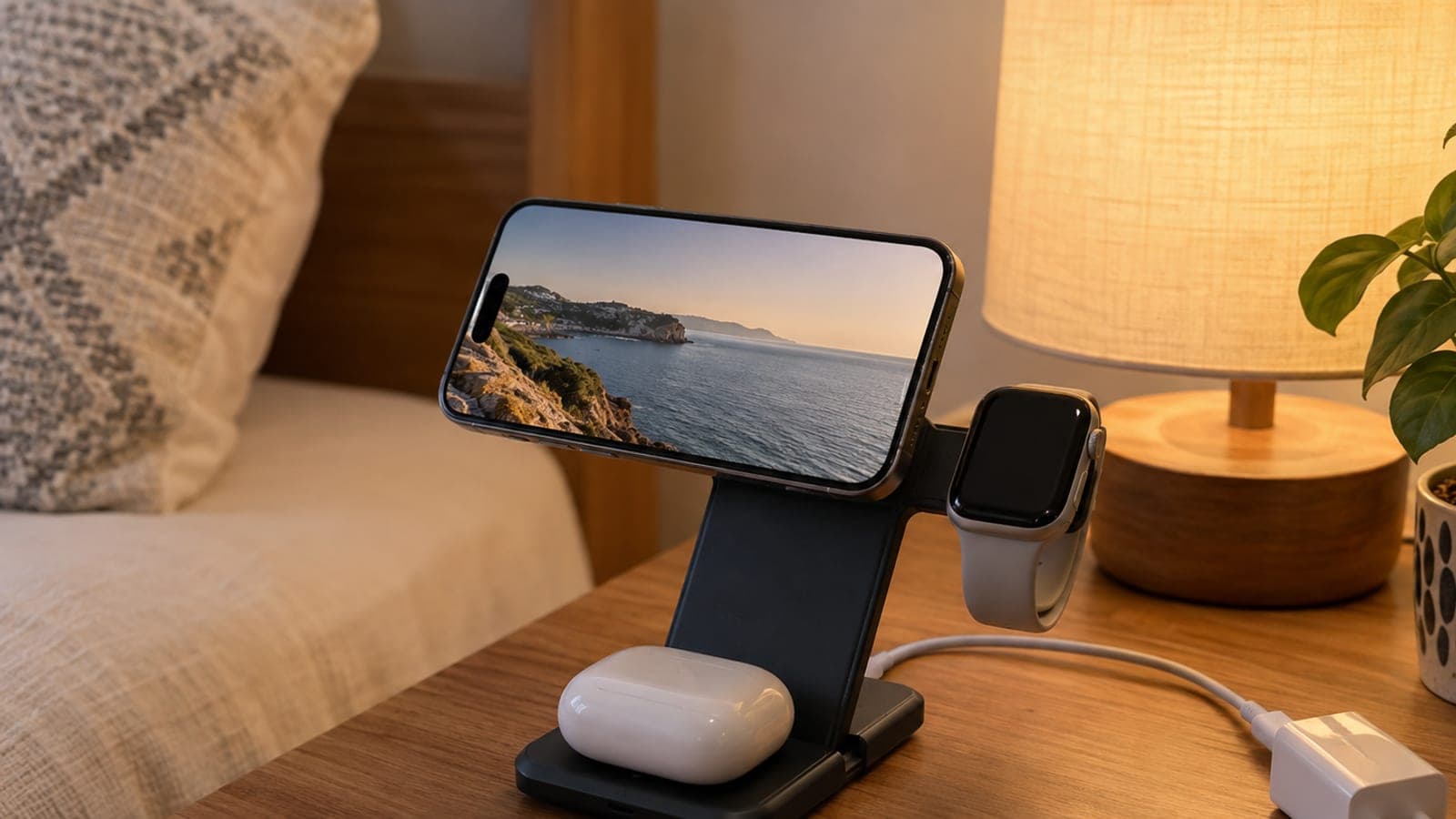
Unfold the stand and plug it into a USB-C adapter rated at 30W or more. Center the iPhone on the MagSafe pad, seat the Apple Watch on the magnetic pad on the side arm, and lay the AirPods case on the lower pad. Turn the iPhone sideways and StandBy kicks in automatically.
What you need
Step by step
Get the right adapter ready
These stands almost never ship with a power adapter, just the cable. To feed three devices at once, use a USB-C adapter rated at 30W minimum, ideally 35-40W. An old 5W phone cube will not run all three pads together.
Unfold the stand and level it
Open the folded body and tilt the iPhone arm back so the base and arm form a solid triangle. Set the stand on a flat, non-slip surface. Adjust the arm angle so the screen is easy to read from where you sit.
Center the iPhone on the magnetic pad
Bring the phone close to the MagSafe pad; the magnets pull it to the center and you feel a light click. Check that the charging icon appears on screen. Thick cases or cases with metal plates can throw off alignment and slow charging, so remove the case if needed.
Place the Apple Watch and AirPods
Set the watch on the round magnetic pad on the side arm so the back sits flush; on models that support it, a lightning-bolt fast charge indicator appears on the watch face. Put the AirPods case in the middle of the lower pad with the LED facing up and wait for the LED to light.
Switch on StandBy mode
Place the iPhone on the magnetic pad in landscape (sideways) position; on iOS 17 and later the StandBy screen opens by itself. On some stands the AirPods pad blocks the phone in landscape, so tilt the AirPods section slightly to make room. In Settings > StandBy you can keep the display always on.
Check heat and charging status
After the first 15 minutes, confirm all three devices are actually gaining charge and the body is not running hot. If it overheats, take the case off or move the stand somewhere shaded and ventilated. When traveling, keep the cable and adapter in the same pocket as the stand so nothing gets left behind.
Tips
Watch out
The most common mistake is charging all three devices from an underpowered or uncertified adapter: devices fill slowly one after another, the body heats up, and battery health suffers over time. Also never leave a credit card, hotel key card, or bank card between the magnetic pad and the phone, as magnetic strips can be damaged.
Frequently asked questions
+Does a power adapter come in the box?
Usually no, only a USB-C cable is included. You need to buy a 30W or higher adapter separately, which adds a bit to the total cost.
+Does Apple Watch fast charging work?
If the stand supports fast charging, it works with Apple Watch Series 7 and later plus Ultra models. Older models charge at normal speed with no lightning bolt icon.
+Can I charge with a case on?
Thin plastic or silicone cases are fine. With cases thicker than 3 mm, or ones with metal plates or wallets, the magnet weakens and charging slows or never starts.
+Why won't StandBy mode turn on?
The phone has to be in landscape, locked, and charging, and it needs iOS 17 or later. Check that the Settings > StandBy toggle is on.
+Can I use it with an Android phone?
Android phones with Qi2 or an added magnetic ring will charge on the iPhone pad. The watch and earbud pads are designed for Apple devices, so other brands will not work there.
Sources and verification
Official pages for this process
Published: September 11, 2026. tell us. Adapted from a Turkish guide; regional certification and travel-voltage notes generalized for an English-speaking audience.
This content is for information only; for official procedures the relevant institution’s current announcements take precedence. Details: disclaimer.