How do I find out whether my address gets fiber or VDSL?
Pin down the connection type at your address in half an hour using operator lookup pages, the modem status screen and the box at your building entrance.
Short answer
Enter province, district, neighborhood, street, building and flat number on your operator's "Altyapı Sorgulama" (infrastructure check) page. "Fiber (FTTH)" means the optical cable reaches inside the flat, up to 1000 Mbps. "VDSL" means fiber stops at the street cabinet and the last 300-1000 metres are copper: 100 Mbps down, 8-16 Mbps up.
What you need
Step by step
Write the full address down
Note the province, district, neighborhood, street, building number and flat number on paper. Infrastructure lookups match records at building-number level, so a wrong street selection returns "no infrastructure" even when the same building already has fiber.
Run the Türk Telekom lookup
On turktelekom.com.tr open "Ev İnterneti" and then the "Altyapı Sorgulama" page. Search either by landline number or by address. The result screen shows the connection type (Fiber, VDSL or ADSL) together with the maximum speed that can be provisioned.
Check the other operators too
Repeat the same lookup on turk.net, superonline.net and vodafone.com.tr. Turkcell Superonline built its own fiber network, so an address that comes back as VDSL on Türk Telekom can return FTTH there. Put the results side by side before deciding.
Read the modem status page
Type 192.168.1.1 in your browser, log in to the modem and open the "Status" or "DSL Status" section. If you see "VDSL2" and a profile such as 17a, your line runs over copper. Fiber uses a separate ONT device where the PON light is solid green and the LOS light stays off.
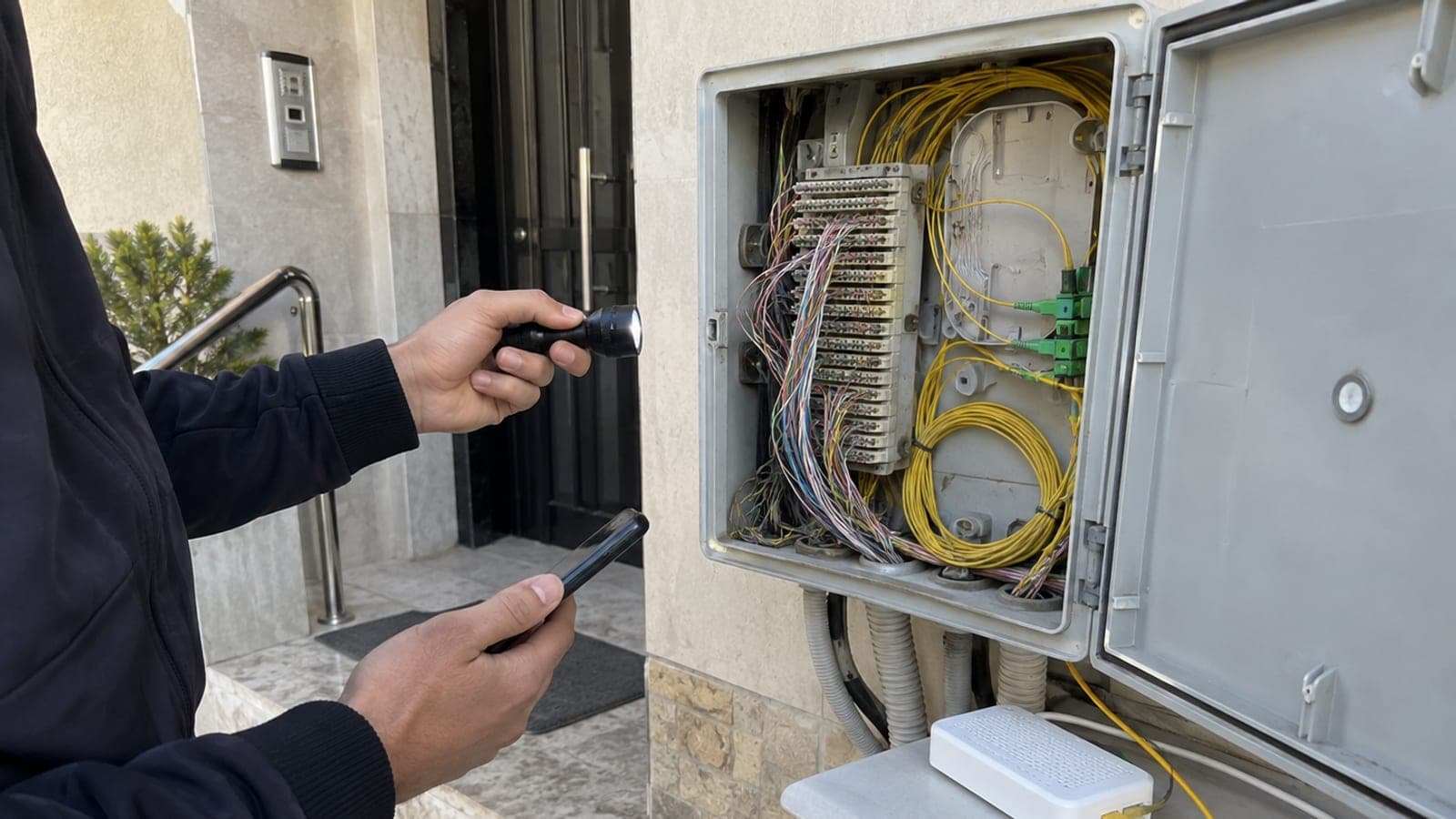
Inspect the box at the building entrance
Use the flashlight on the telecom box in the entrance hall. Only thin copper pairs and RJ11 telephone terminals means the infrastructure is VDSL. Yellow or white 2-3 mm fiber patch cables and a box labelled ONT or ODF means fiber has already been pulled into the building.
Measure the speed over cable
Connect the computer to the modem with the ethernet cable, turn Wi-Fi off and test on hiztesti.btk.gov.tr. Download clearly above 100 Mbps means the line is fiber. If upload sticks in the 8-16 Mbps band, you are almost certainly on VDSL.
Open a migration request if fiber is available
When the result is FTTH, book an appointment through the operator's "Fibere Geçiş" (switch to fiber) form, or call 444 1 444 for Türk Telekom. If the in-building riser is ready, the technician installs the ONT in 1-2 hours; if the riser must be pulled, expect 3-15 business days.
Tips
Watch out
If fiber arrives at your address after you signed a committed VDSL contract, switching inside the same operator is usually free of early termination fees, but changing operators puts the remaining commitment on a single bill. Read the "fibere geçiş" and early termination clauses before you sign.
Frequently asked questions
+Does VDSL count as fiber?
Partly. Fiber runs from the exchange to the street cabinet, then copper telephone cable continues to your home. That is why the speed ceiling stays at 100 Mbps.
+The lookup says fiber but my modem is VDSL. Why?
Fiber may have reached the building only. Until a fiber drop is pulled into your flat and an ONT is installed, your connection stays on copper. Open a switch-to-fiber request and book a technician.
+Will my current modem work on fiber?
A VDSL modem alone will not work on fiber; an ONT is required. Plug the ONT's ethernet cable into the modem's WAN port and you can keep the old modem for Wi-Fi and port sharing.
+What if no infrastructure shows up at my address?
Call Türk Telekom on 444 1 444 and file an infrastructure request; the number of requests from one address feeds their investment planning. A 4.5G home internet box works as an interim option.
+Is there a latency difference between fiber and VDSL?
Yes. In-game ping is typically 10-25 ms on fiber and 20-45 ms on VDSL, and line length plus line quality widen that gap.
Sources and verification
Official pages for this process
Published: September 14, 2026. tell us. Operator names, phone numbers and menu labels are Türkiye-specific; UI labels are kept in Turkish as they appear on screen.
This content is for information only; for official procedures the relevant institution’s current announcements take precedence. Details: disclaimer.